
We make use of a coverage map to provide an indication of which services may be available at your location.
While we make every effort to keep our coverage information as accurate and up to date as possible, coverage shown on the map cannot be guaranteed.
Below is a full explination of the application process.
Please take note of the following installation times:
- Estate Fibre – up to 7 work days
- Openserve Fibre to the home – up to 30 days
- Starter/Home & business Wireless – up to 7 work days
- Fibre over Wireless – up to 14 work days
How to Apply for an Internet Service
Follow the steps below to select your preferred internet package and request a quotation.
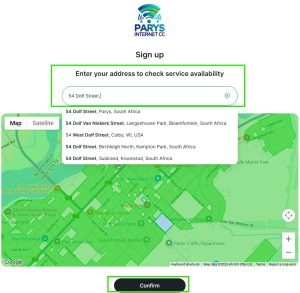
1. Provide Your LocationEnter your physical address, or select your location directly on the provided map. Once the correct location has been selected, click Confirm. Your location allows us to determine which services may be available in your area. |
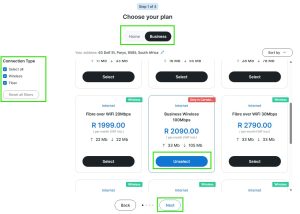
2. Choose Your ServiceThe available services will be displayed, generally listed in price order. |
 |
 |
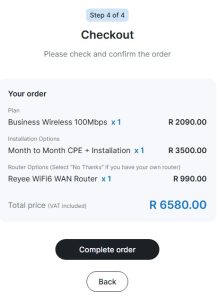
3. Complete Your DetailsEnter your personal or business information exactly as you would like it to appear on your quotation and invoices. Please take note of the following:
Once all the required information has been completed, click Next. |
4. Select Your Installation OptionsOn the next screen, select the installation options that best suit your requirements. If you are unsure which option to choose, don’t worry. We will contact you before preparing the final quotation to confirm your selection and explain any options or requirements that may be unclear. Once completed, click Checkout. |
|
|
 |
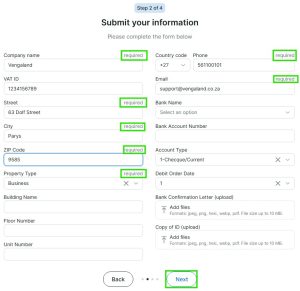
5. Review and Submit Your ApplicationA summary of your selected service and options will be displayed. Check that the information is correct and click Complete Order to submit your application. |
|
What Happens Next?
Once we receive your application, our team will:
- Review your selected service and installation requirements.
- Perform a manual coverage check to confirm that the selected service is available at your location.
- Contact you to confirm your physical address and service selection and clarify any installation requirements.
- Prepare and send you a formal quotation.
Please note: Services displayed as available during the online application process are based on our coverage information and do not guarantee service availability. Final availability is subject to a manual coverage assessment by our team.